网站标题魔改
步骤
新建文件[BlogRoot]\source\js\custom.js,写入以下内容:
1
2
3
4
5
6
7
8
9
10
11
12
13
14
15
16
17
//动态标题
var OriginTitile = document.title;
var titleTime;
document.addEventListener('visibilitychange', function () {
if (document.hidden) {
//离开当前页面时标签显示内容
document.title = '🚀不要走嘛,在看看吧~';
clearTimeout(titleTime);
} else {
//返回当前页面时标签显示内容
document.title = '⚓欢迎回来~';
//两秒后变回正常标题
titleTime = setTimeout(function () {
document.title = OriginTitile;
}, 2000);
}
});在主题配置文件_config.butterfly.yml引入该文件:
1
2
3
inject:
bottom:
+ - <script async src="/js/custom.js"></script>
效果
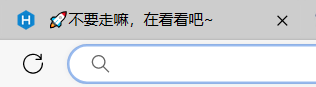
tips: 网站图标更改: 替换文件themes/butterfly/source/img/favicon.png